As computing becomes more ubiquitous in our objects, designers need to be more aware of how to design meaningful interactions into electronically enhanced objects. At the University of Washington, a class of junior Interaction Design majors is exploring this question. These pages chronicle their efforts.

Wednesday, June 10, 2015

Power // Nick Ricci & Naoki Hisamoto

Since we are using a gutted lamp we decide to use the existing wiring to carry the 12v needed to power the LEDs and everything else. Since the arduino can be powered by USB and 12v is the same as what comes out of the cigarette lighter outlet in a car, a car USB charger was perfect to power the arduino without having to mess with converting the voltage. everything would hang by this cord, through the container, and the extra wiring through the MDF piece. We accounted for all of the wires and the cigarette lighter USB charger worked perfectly. The 12v successfully powers the LEDs and the USB charger powered the Arduino and all of the pieces on the prototype board including the relays and ultrasonic sensor.


Camera // Nick Ricci & Naoki Hisamoto

We began the search for the perfect camera for the lamp.

We began with the Pentax Q1, the perfect size for the lamp. It offered the ability of an interchangeable lens, full manual control, as well as the size that was perfect for the lamp. Unfortunately we discovered it would take rewriting some of the firmware to make it possible to control the camera via USB from the arduino. Keeping this in mind we found the Panasonic GF1, a Micro 4/3 camera that not only would fit but could be controlled by an external release cable. We had the camera completely functional and wanted to run consistent power running through the camera rather than powering it through a battery that would only last for a certain duration. We hacked the battery to use the case but gutted it and hooked up appropriate voltage to power the camera. However, something shorted the camera and we destroyed the camera.


On june 8th 2015, the GF1 died.

We replaced it with the Canon G15. It was slightly smaller than the GF1 but was not as good quality. We decided to simply use the battery because the costs were adding up and we felt that the proof of concept was more important that this worked. It works beautifully. 


Internal Frame // Nick Ricci & Naoki Hisamoto


For the construction of the lamp we decided to gut an existing lamp (Hektar from IKEA) and mount the camera, arduino, and everything else inside. The final design is made up from MDF and Acrylic that we laser cut.  It took a few prototypes in cardboard but we finally got it. The original structure was designed so that the Arduino would sit at the very top cylinder of the lamp but we found that the USB cord would not allow that. The MDF piece sat too low so we connected the legs to the MDF and acrylic piece and used a nut to hold everything to a pre-existing piece that the light bulb hung from. We then decided to mount the camera onto a bracket that was also held by the nut. The arduino and prototype board sit in the area between the MDF and acrylic board. 


Ultrasonic Sensor // Nick Ricci & Naoki Hisamoto

We used an Ultrasonic Range Sensor from Radioshack to be our initiating sensor. Our initial plan was to use a Raspberry Pi and have it use shape recognition in order to recognize the shape of a plate. This recognition would send a serial signal to the Arduino using Case to begin lighting and trigger the camera. However, we came across many issues with the Raspberry Pi and decided we would do everything on the Arduino. We came across this sensor as well as infrared emitters and detectors. However, we decided to use the Ultrasonic Sensor because we felt we understood all of the functionality of this sensor better. The sensor is coded to read distances and then trigger all the rest of the code when a certain distance is received or otherwise just keep the LEDs dim.

The Pi Problems // Maddy Harrison & Ben Schiffler

Ah, the last and most tricky piece of software. In order to get all of our code working, we heavily relied on the GardenBot website, which had a TON of useful information on getting our readings to work effectively and efficiently. However, we didn't have a great source on how to get our Raspberry Pi working with the arduino, the sensors, and twitter. So, we turned to google!


Which led us to "Parky's Place", and his garage-flood-monitoring system. The gist is, a guy had his garage flood all the time - except when he was trying to find out where the water was coming from. So, he hatched a plan - he built an arduino with a moisture sensor and hooked it up to a raspberry pi, so that it would notify him via twitter and SMS whenever moisture was detected.  You can see from the system diagram above that he had a very similar flow to us, and so we were able to poke through his code and get an idea of how we could build our system.


And that's when we ran into our first stumbling block: setting up the Raspberry Pi. The Pi is imaged off of an SD card, which we had to unmount and rewrite to use "Raspbian", a Raspberry Pi based version of Linux. This was super tricky because unfortunately there's a bug in Mac OS's, where if you put in an SD card, sometimes it will be "read only". We used a hacky fix described here, which require you setting the "lock" on the SD card to be only halfway, which ended up working (after much annoyance).


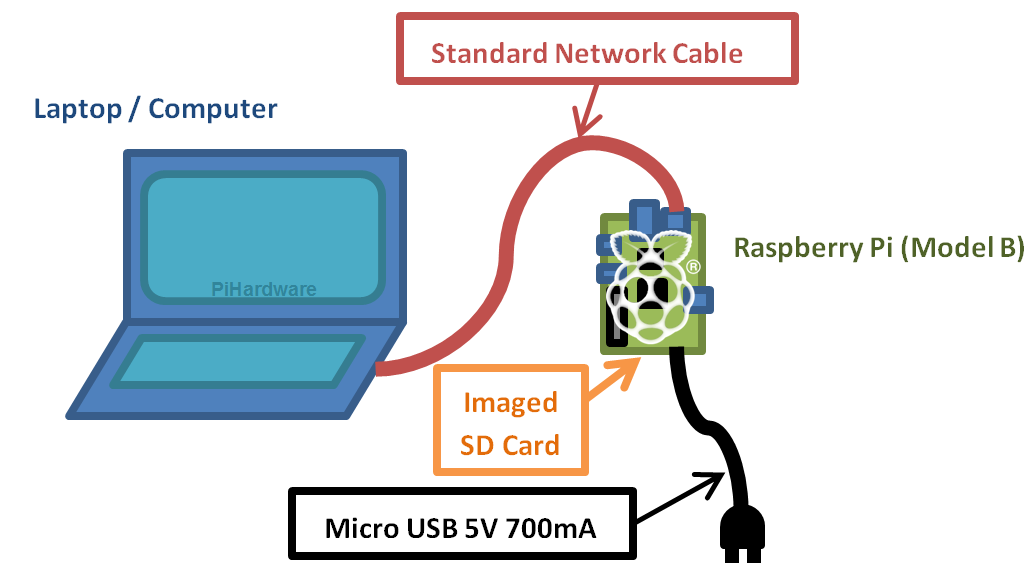
After reimaging the card, we had to figure out a way to connect to the Raspberry Pi. We couldn't remotely connect because of WiFi issues on the UW campus, and we didn't have a spare screen and monitor with HDMI to program via the Pi itself, so we attempted our second hacky solution, described in the second diagram above and this website: Connecting directly via SSH using an ethernet port and internet sharing straight from the laptop.

It ended up working great (after much tweaking) and we wrote a slick python script in Vi (via SSH). It also was our third hacky solve - to bypass lots of event handling, we just set the script to trigger whenever we output a keyword to the console from the Arduino, which was watched constantly by the Pi. This was a similar solution to how the garage-flood-monitoring system worked, with some adjustments for our specific case.

All in all, a very hacked-together but totally working solution!

Movie Magic // Maddy Harrison & Ben Schiffler

With our pieces in place and our ducks all pre-rowed, we then turned our focus towards making the movie of our presentation. Because our plant had a fun, light aesthetic, we opted on the side of fun and made our movie script told from the perspective of a plant with a neglectful owner.


In order to properly convey the plant's environment, we built a small fake corner of a fake apartment in the back of the studio, where we could test it under consistent conditions. It worked pretty well and looked great!


Then we recorded the script into audio using Ben's Blue Snowball mic. We just did it in one or two takes, and then set it to music that Maddy found online that fit our upbeat mood and aesthetic.


Once we had the audio, we needed to record the video. We needed to make sure that the viewer understood that the plant was the one that was talking, so we had Maddy underneath the desk with a fishing line attached to the plant, puppeting it to the audio. I spoke the script out loud so the jostling would be in motion, while Rishi squished himself into the right spot to get the video captured with everything else happening around it.


All that said and done, we edited it together in premiere, tweaked the audio levels, added a few transitions and made a ~1 minute video that conveys the story of "Sprout"!

LED Strip // Nick Ricci & Naoki Hisamoto


To illuminate the table and ultimately the food we are using warm strip LEDs that are powered by a 12v adapter. They are arranged to mimic a photographic ring light providing the perfect amount of light for the photo. We wanted a constant dim light to be illuminating the space so we used MOSFET in order to control the voltage going into the LEDs. By doing this, we are able to brighten the light as the lamp senses food arriving at the table to take a better exposed picture.