A humming bird eventually came by, and we were excited to see the Arduino in action! Unfortunately the hummingbird was on to us, and ate on the opposite side of the lends behind the feeder so the PIR didn't see him. Amy and I decided that this meant we needed to look at the code again and adjust the sensitivity so it would pick up the hummies and not our big moving bodies...and maybe use the feeder with only one spout.
Friday, June 7, 2013
Becoming a slave to our Arduino...
We decided that it was time to test the arduino on actual hummingbirds, so we set up the camera with a super official, not shady at all extension cord wrapped around the banister on Amy's deck. We wanted to sit and watch, so we settled in the corner of the deck to see how well the system would work, but every time we would make a hand gesturer or shift in our seat the camera would go off! After trying to sit very ver still in the rain for a while, we decided we should go inside and watch through a window.

Thursday, June 6, 2013
Friday Night Tights - Sarah Churng, Mallika Simone
Our 'Friday Night Tights' are a leggings & Fanny Pack combo that house the Arduino and run wires down to the pressure sensors which slip into the users shoes. Although we originally were playing with a more kitschy aesthetic to boost the humorous nature of our design we eventually decided on a more chic and wearable look. The leggings have strips of pleather down the outside of each leg which we doubled with a jersey lining on the inside, creating a casing for our wires. We sewed a matching pleather pouch (to hold the Arduino) to the waistband of the leggings and ran the wires through the waistband and into the back of the pouch. We poked an LED light though the outside of the pouch, which lights up when the user is walking while intoxicated.
In progress


in action

In progress


in action

Storyboard for Friday Night Tights — Mallika Simone, Sarah Churng
We shot our video on Monday, May 18th, using this storyboard as our general guide. Overall, we plan to have a polished look and feel to our documentary style video, but with a layer of dry humor as a way of delivering the message. Drunk walking is, after all, a serious issue, albeit with a hilarious reality.
 |
| Intro shot: Explanation of situation, Introduction of product |
 |
| Our heroine and Party Girl, Erika arrives at her local watering hole. |
 |
| Sober, she walks with a steady pace. We indicate what the sensors are doing by highlighting her steps' rhythm and pressure weights with movie effects. |
 |
| As the night wears on, she becomes increasingly impaired. |
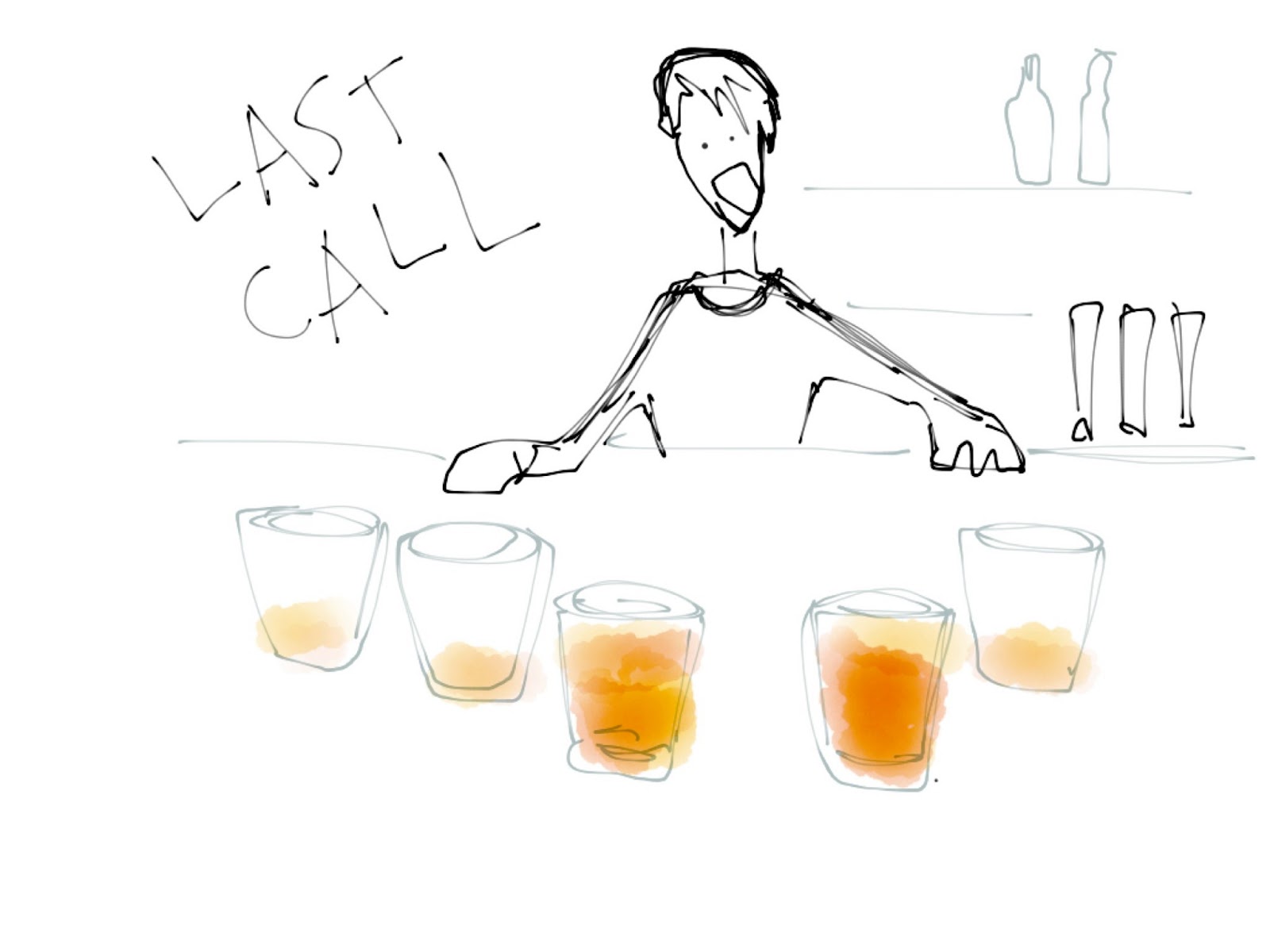 |
| As the bar closes, it's evident Erika has had a fair share to drink. |
 |
| It's well past the last bus pickup time, and Erika has no cash for a cab. |
 |
She attempts to walk home, but she's clearly drunk and stumbling.
We indicate what the device is doing again. This time, the pacing and pressure
indicators are unsteady and irregular.
We indicate what the device is doing again. This time, the pacing and pressure
indicators are unsteady and irregular.
 |
| She slumps into the side of a building. BAD. |
 |
| Rewind: TAKE 2. We see our star again, this time outfitted properly with the device on. It detects that her steps are way too uneven to walk home without the risk of falling or walking into traffic. |
 |
| Cut to a shot of her friend receiving a text from the device, notifying us of Erika's situation. |
 |
| This time she's slumped over, but Friday Night Tights is hard at work. |
 |
| Her friend comes up to save her. GOOD. |
Logic // Drunk Walking Detection - Mallika Simone, Sarah Churng

This poster maps out our detection of different walking patterns and the way our Arduino responds to the detected information.
C++ Memory dump error resolved, Custom Queue class — Mallika Simone, Sarah Churng
For a while, we were struggling with a memory dump problem whenever we used the QueueArray structures in our code. About 2 weeks ago, we fixed them. In C++, when you pass an object as a function argument in C, it makes a copy of the object, instead of just calling it in reference. Which is fine for chars and ints and whatnot small objects. But since the built-in garbage collection will throw away that instance every call you make, it ends up building a new copy every single time you call the function*.
The fix: Use '&' in your calls to reference the object, rather than copy it. Here's our function getAverage, which returns the average of the contents of a QueueArray:
// Get Average of the contents of a queue of ints:
int getAverage(QueueArray <int>& qa){
int sum = 0; //the summation of values
int cnt = qa.count(); //the count of distinct values
while ( !qa.isEmpty() ) {
sum = sum + qa.pop();
}
return ( sum / cnt ); //return the mean average
}
Also, here's an override of QueueArrays, called Queue, which we are using because it has custom functions for our drunk-detection purposes:
class QueueNode {
public:
QueueNode(int val, QueueNode* next)
{
_val = val;
_next = next;
}
int _val;
QueueNode* _next;
};
class Queue {
public:
Queue() {
head = NULL;
}
void Append(int val) {
QueueNode* qn = new QueueNode(val, head);
head = qn;
};
void Clear() {
QueueNode* cur = head;
head = NULL;
while (cur != NULL)
{
QueueNode* next = cur->_next;
delete cur;
cur = next;
}
}
float Average() {
int cnt = 0;
int sum = 0;
QueueNode* cur = head;
while (cur != NULL) {
cnt++;
sum += cur->_val;
cur = cur->_next;
}
if (cnt == 0)
return 0.0;
else
return (float)sum/(float)cnt;
}
private:
QueueNode* head;
};
Tuesday, May 28, 2013
Randy & Charlie: It's All Coming Together

Wiring all the microphones together to later put into a wearable device. Code works pretty well.
/*
  New code for the microphones.
  Uses four arrays to keep running averages for each microphone for the last ten seconds
  and sets the average of the ten as the threshold.
  Sound below the threshold will not register in the vibration motors.
*/

// The analogue input pins each microphone is plugged into.
const int electret1 = 0;
const int electret2 = 1;
const int electret3 = 2;
const int electret4 = 3;

// The analogue output pins each vibration motor.
const int vibration1 = 11;
const int vibration2 = 10;
const int vibration3 = 9;
const int vibration4 = 6;

// Variable to store the value read from the sensor pins.
int sensorReading1 = 0;
int sensorReading2 = 0;
int sensorReading3 = 0;
int sensorReading4 = 0;

// The queue of running averages for each microphone to set threshold.
int sensorMax1[10];
int sensorMax2[10];
int sensorMax3[10];
int sensorMax4[10];

// Queue to temporarily store data.
int temp[10];

// The minimum.
int sensorMin = 1023;

// The threshold that needs to be surpassed to register.
int threshold1;
int threshold2;
int threshold3;
int threshold4;

// Keep track of time to take samples every instance.
int time;

// SETUP
void setup() {

  // Use the serial port 57600 to read faster than 9600.
  Serial.begin(57600);

  // Set the vibration motors as output.
  pinMode(vibration1, OUTPUT);
  pinMode(vibration2, OUTPUT);
  pinMode(vibration3, OUTPUT);
  pinMode(vibration4, OUTPUT);

  delay(2000);

  // Record time it took to get here.
  time = millis();

  Serial.print("Time: ");
  Serial.println(time);
  // For ten seconds...
  for (int i = 0; i < 10; i++) {
    // Every 5 seconds, add a microphone reading to each microphone reading queue.
    Serial.print("Passed: ");
    Serial.println(millis() - time);

    sensorReading1 = analogRead(electret1);
    push(sensorMax1, sensorReading1);

    sensorReading2 = analogRead(electret2);
    push(sensorMax2, sensorReading2);

    sensorReading3 = analogRead(electret3);
    push(sensorMax3, sensorReading3);;

    sensorReading4 = analogRead(electret4);
    push(sensorMax4, sensorReading4);
    delay(1000);
  }

  Serial.print("Setup sensor1:");
  Serial.println(sizeof(sensorMax1));

  Serial.print("Setup sensor2:");
  Serial.println(sizeof(sensorMax2));

  Serial.print("Setup sensor3:");
  Serial.println(sizeof(sensorMax3));

  Serial.print("Setup sensor4:");
  Serial.println(sizeof(sensorMax4));

  // Set the threshold for each microphone as the average of the queue.
  Serial.println("Lets begin.");
  averageMicrophones();
}


// THE LOOP
void loop() {
  // For stability, start out with low on all vibration motors.
  digitalWrite(vibration1, LOW);
  digitalWrite(vibration2, LOW);
  digitalWrite(vibration3, LOW);
  digitalWrite(vibration4, LOW);

  // Read the sensor and store it in a variable.
  sensorReading1 = analogRead(electret1);
  sensorReading2 = analogRead(electret2);
  sensorReading3 = analogRead(electret3);
  sensorReading4 = analogRead(electret4);

  // if the sensor reading is greater than the threshold:
  if (sensorReading1 >= threshold1) {
    Serial.print("Mic1: ");
    Serial.print(sensorReading1-threshold1);
    Serial.print("    ");
    if (sensorReading1-threshold1 > 10) {
        digitalWrite(vibration1, HIGH);
    }
  } else {
    Serial.print("Mic1: 0    ");
  }

  if (sensorReading2 >= threshold2) {
    Serial.print("Mic2: ");
    Serial.print(sensorReading2-threshold2);
    Serial.print("    ");
    if (sensorReading2-threshold2 > 10) {
        digitalWrite(vibration2, HIGH);
    }
  } else {
    Serial.print("Mic2: 0    ");
  }

  if (sensorReading3 >= threshold3) {
    Serial.print("Mic3: ");
    Serial.print(sensorReading3-threshold3);
    Serial.print("    ");
    if (sensorReading3-threshold3 > 10) {
        digitalWrite(vibration3, HIGH);
    }
  } else {
    Serial.print("Mic3: 0    ");
  }

  if (sensorReading4 >= threshold4) {
    Serial.print("Mic4: ");
    Serial.print(sensorReading4-threshold4);
    Serial.print("    ");
    Serial.print("\n");
    if (sensorReading4-threshold4 > 10) {
        digitalWrite(vibration4, HIGH);
    }
  } else {
    Serial.print("Mic4: 0    ");
    Serial.print("\n");
  }

  Serial.print("Mic1 Average: ");
  Serial.print(threshold1);
  Serial.print("   ");
  Serial.print("Mic2 Average: ");
  Serial.print(threshold2);
  Serial.print("   ");
  Serial.print("Mic3 Average: ");
  Serial.print(threshold3);
  Serial.print("   ");
  Serial.print("Mic4 Average: ");
  Serial.println(threshold4);
  Serial.print("\n");

  // Every second, take a reading and use it to adjust the average.
  if (millis() % 1000 == 0) {
    // Put in new data.
    push(sensorMax1, sensorReading1);
    push(sensorMax2, sensorReading2);
    push(sensorMax3, sensorReading3);
    push(sensorMax4, sensorReading4);
    // Average the data.
    averageMicrophones();
  }

  delay(2);  // Better for Processing showing data
}


// Averages all the microphone readings.
void averageMicrophones() {

  // Average the recordings of micrphone 1.
  int sum = 0;
  for (int i = 0; i < 10; i++) {
     sum = sum + sensorMax1[i];
  }
  threshold1 = sum / 10;

  // Average the recordings of micrphone 2.
  sum = 0;
  for (int i = 0; i < 10; i++) {
     sum = sum + sensorMax2[i];
  }
  threshold2 = sum / 10;

  // Average the recordings of micrphone 1.
  sum = 0;
  for (int i = 0; i < 10; i++) {
     sum = sum + sensorMax3[i];
  }
  threshold3 = sum / 10;

  // Average the recordings of micrphone 1.
  sum = 0;
  for (int i = 0; i < 10; i++) {
     sum = sum + sensorMax4[i];
  }
  threshold4 = sum / 10;
}

void push(int data[], int sensorReading) {
  // Shift all items one slot.
  for (int i = 9; i > 0; i--) {
    data[i] = data[i-1];
  }
  // Add new data to the beginning.
  data[0] = sensorReading;
}

After discovering that we could buy the microphone with working amp all in one package (https://www.sparkfun.com/products/9964) we bought four and hooked them up. They worked immediately. It was joyous. When the
/*
 Randy
 Starts and you must wait four seconds for it to read the ambient sound in the environment
 and adjust the threshold accordingly.
 */


// these constants won't change:
const int ledPin = 13;      // led connected to digital pin 13
const int electret1 = 0;  // the amplifier output is connected to analog pin 0
const int electret2 = 1;
const int electret3 = 2;
const int electret4 = 3;

// these variables will change:
int sensorReading1 = 0;      // variable to store the value read from the sensor pin
int sensorReading2 = 0;
int sensorReading3 = 0;
int sensorReading4 = 0;
int sensorMax1 = 0;
int sensorMax2 = 0;
int sensorMax3 = 0;
int sensorMax4 = 0;
int sensorMin = 1023;
int threshold1;
int threshold2;
int threshold3;
int threshold4;

void setup() {
  pinMode(ledPin, OUTPUT); // declare the ledPin as as OUTPUT
  Serial.begin(57600);       // use the serial port
  pinMode(13, OUTPUT);
  digitalWrite(13, HIGH);
  while (millis() < 3000) {
    delay(1000);
    threshold1 = analogRead(electret1);
    threshold2 = analogRead(electret2);
    threshold3 = analogRead(electret3);
    threshold4 = analogRead(electret4);

    // record the maximum sensor value
    if (threshold1 > sensorMax1) {
      sensorMax1 = threshold1;
    }

    if (threshold2 > sensorMax2) {
      sensorMax2 = threshold2;
    }

    if (threshold3 > sensorMax3) {
      sensorMax3 = threshold3;
    }

    if (threshold4 > sensorMax4) {
      sensorMax4 = threshold4;
    }
  }

  // signal the end of the calibration period
  digitalWrite(13, LOW);
  threshold1 = sensorMax1;
  threshold2 = sensorMax2;
  threshold3 = sensorMax3;
  threshold4 = sensorMax4;

  // led pins
  pinMode(3, OUTPUT);
  pinMode(6, OUTPUT);
}

void loop() {
  digitalWrite(3, LOW);
  digitalWrite(6, LOW);

  // read the sensor and store it in the variable sensorReading:
  sensorReading1 = analogRead(electret1);
  sensorReading2 = analogRead(electret2);
  sensorReading3 = analogRead(electret3);
  sensorReading4 = analogRead(electret4);

  // if the sensor reading is greater than the threshold:
  if (sensorReading1 >= threshold1) {
    Serial.print("Mic1: ");
    Serial.print(sensorReading1-threshold1);
    Serial.print("    ");
  } else {
    Serial.print("Mic1: 0    ");
  }

  if (sensorReading2 >= threshold2) {
    Serial.print("Mic2: ");
    Serial.print(sensorReading2-threshold2);
    Serial.print("    ");
    if (sensorReading2-threshold2 > 10) {
        digitalWrite(3, HIGH);
    }
  } else {
    Serial.print("Mic2: 0    ");
  }

  if (sensorReading3 >= threshold3) {
    Serial.print("Mic3: ");
    Serial.print(sensorReading3-threshold3);
    Serial.print("    ");
    if (sensorReading3-threshold3 > 10) {
        digitalWrite(6, HIGH);
    }
  } else {
    Serial.print("Mic3: 0    ");
  }

  if (sensorReading4 >= threshold4) {
    Serial.print("Mic4: ");
    Serial.print(sensorReading4-threshold4);
    Serial.print("    ");
    Serial.print("\n");
  } else {
    Serial.print("Mic4: 0    ");
    Serial.print("\n");
  }


  delay(2);  // Better for Processing showing data
}
Subscribe to:
Posts (Atom)